
In order for the income statement to start fresh in accounting software, the user typically needs to close the old financial year and open a new one. During this process, the income statement balances are zeroed out by transferring them to equity in the balance sheet. In SimplBooks this is handled by automatic closing entries, meaning the user does not need to manually close and open financial years.
NOTE! Closing entries appear in the program immediately after the financial year ends, but they do not prevent bookkeeping for the previous financial year. They are updated automatically if changes are made to the previous period.
See HERE for answers to frequently asked questions about closing entries!
Opening and closing the financial year
SimplBooks handles the closing and opening of the financial year automatically on behalf of the user. The program does this using automatic accounting closing entries, provided that automatic entries are activated in the environment settings. Automatic entries are enabled by default in the program’s initial settings.
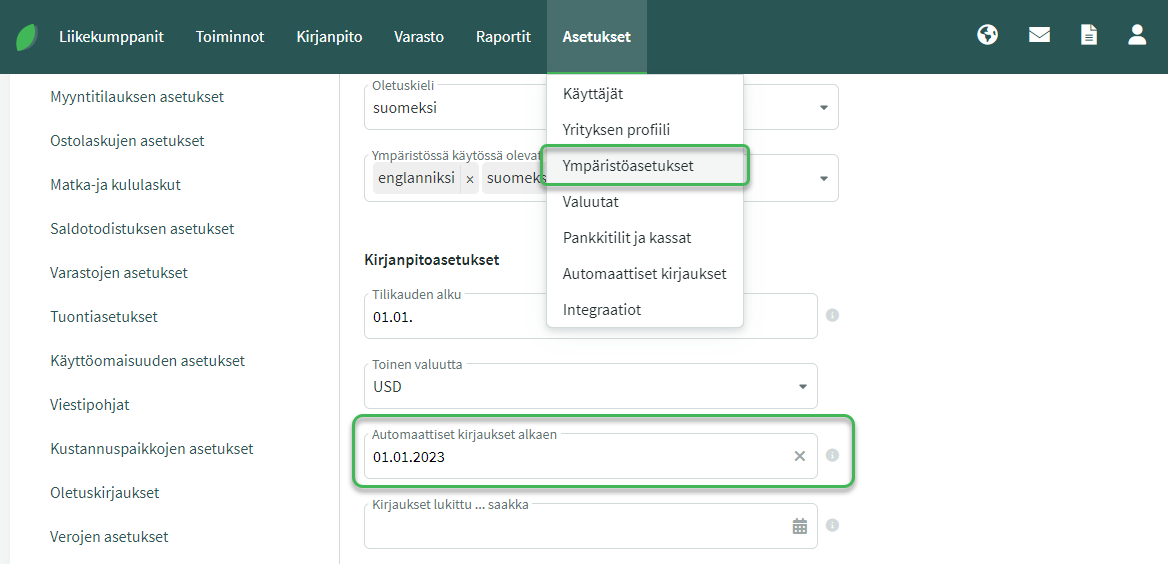
The start date of automatic entries must be the same as or earlier than the date of the first entry.
You can find the date of the first entry under Accounting > Entries. You can sort entries by date.
Can I make entries for the previous financial year?
Even though the program closes the financial year automatically, closing entries do not prevent bookkeeping and financial statement preparation for the ended financial year. You can freely make changes to the ended financial year, as the program updates closing entries automatically after each change.
When you no longer want to make changes to the ended financial year, you can lock the period under Settings > Environment Settings > “Entries locked until…”.
NOTE: When entries are locked, automatic entries will not be updated either.
Leave A Comment?